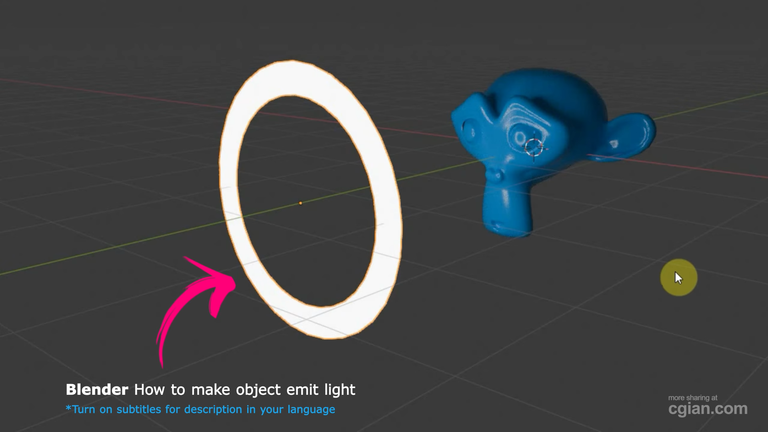
This tutorial by CG Ian walks through the process of making an object produce light in Blender, using the “Monkey Susan” model as a practical example. The goal is to help Blender users — particularly beginners and intermediate learners — understand how to create emissive materials on objects to improve scene lighting.
You will learn how to build a light-emitting ring object, apply modifiers for smoothness, set up emission materials, and preview your results using the Cycles render engine. This guide is ideal for anyone looking to add self-illuminating materials to their 3D models while strengthening their overall lighting skills in Blender.
Timeline Summary
00:00 – 00:33: Introduction and Initial Setup
- CG Ian introduces the tutorial, focused on making an object produce light in Blender.
- Shows how to switch to material preview mode and apply a blue glossy material to the Monkey Susan model.
- Switches back to solid shading and hides Monkey Susan to prepare for adding a new light-emitting object.
Key takeaway: Setting up the initial scene and preparing the base object.
00:33 – 01:21: Creating and Shaping the Light Object
- Adds a circle mesh to create a ring shape, reducing vertices to eight for simplicity.
- Enters edit mode, extrudes and scales faces to form a ring.
- Adds a subdivision surface modifier with level 2 for smoothing.
- Makes Monkey Susan visible again, then positions and rotates the ring in front of it.
Key takeaway: Creating and positioning the ring object that will produce light.
01:21 – 02:03: Applying Emission Material and Lighting
- Switches to render preview and the Cycles render engine to check lighting.
- Applies a new material to the ring object and changes it to an emission shader.
- Increases emission strength to 10 to illuminate Monkey Susan effectively.
Key takeaway: Using emission shaders on objects to create self-illuminating effects.
Key Points
- Material Preview Mode is helpful for applying and previewing materials on objects during setup.
- Low-vertex Circle Mesh simplifies the process of creating a ring shape for the light source.
- Subdivision Surface Modifier smooths out the mesh, making the light object visually appealing.
- Emission Shader in Blender allows any mesh to act as a light source, providing direct illumination.
- Cycles Render Engine is preferred for accurate preview and rendering of emissive materials.
Key Insights
- Combining modifiers with emission materials is an efficient way to create interesting lighting effects without adding separate light objects.
- Reducing vertices before applying subdivision offers a controlled, smooth shape and optimizes the modeling workflow.
- The approach clearly separates modeling and lighting setup phases, which improves clarity for beginners.
- The tutorial highlights the importance of switching render modes (Material Preview vs. Render Preview) to effectively check both materials and lighting.
- Emission strength adjustment provides flexibility in controlling the light intensity emitted by objects.
Frequently Asked Questions (FAQs)
Q1: Why choose a ring shape for the light object?
A1: The ring shape evenly surrounds the model, providing balanced illumination and a visually appealing light source.
Q2: Can any object be made to produce light in Blender?
A2: Yes, any mesh object can produce light by applying an emission shader to its material.
Q3: Why use the Cycles render engine instead of Eevee?
A3: Cycles provides more realistic lighting and accurate rendering of emissive materials compared to Eevee’s real-time engine.
Q4: What is the purpose of the subdivision surface modifier here?
A4: It smooths the low-vertex ring mesh to avoid harsh edges and create a clean light source.
Q5: How do you adjust the brightness of the light produced by the object?
A5: By changing the emission shader’s strength value in the material properties.
Conclusion
This video effectively guides Blender users through the method of creating objects that produce light, improving scene illumination with emissive materials rather than traditional light sources. It combines modeling, material editing, and rendering setup into a clear, beginner-friendly workflow. The main recommendation is to experiment with shape design, emission strength, and render preview modes to achieve your desired lighting effects. Moving forward, practice applying emission shaders to various objects and explore additional lighting setups to enrich your 3D scene compositions.
by blenderian
Read More,
How to Master Blender Light Strength for Stunning Renders